
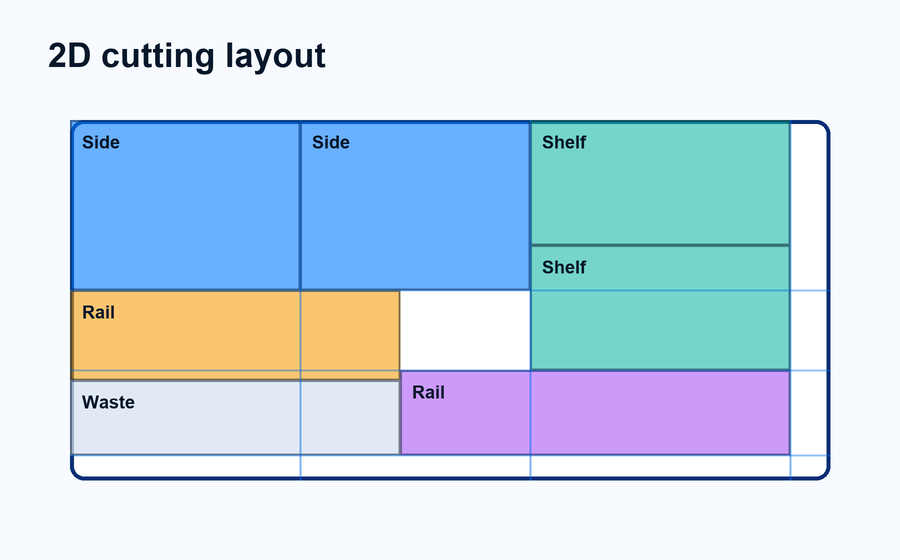
Cutting rectangular parts from plywood, MDF, acrylic, or other sheet material can look simple when there are only a few pieces. The problem gets harder as soon as you have many parts, repeated quantities, rotation choices, kerf, and a limited number of sheets.
This is the two-dimensional cutting stock problem. The goal is to place required rectangular parts onto stock sheets while using as few sheets, or as little material, as practical.
A cutting stock optimizer helps you model the stock sheet, enter the required parts, account for saw blade thickness, and inspect a candidate layout before cutting material.
What is 2D cutting stock?
2D cutting stock is the task of cutting smaller rectangular parts from larger rectangular sheets. The stock sheet might be a plywood panel, MDF sheet, laminate sheet, metal plate, or another material that can be represented by length and width.
A model usually includes one or more stock sheet sizes, a list of part dimensions and quantities, and rules such as whether parts may be rotated 90 degrees. The solver returns a placement plan showing which part goes on which sheet and where it is located.
The geometric layout is only part of the real-world workflow. Grain direction, surface finish, defects, clamping, tooling, machine limits, and operator preferences may still affect the final cut plan.
How guillotine cutting relates to sheet layout
NpSolv models this solver as a rectangular guillotine cutting problem. A guillotine cut is a straight cut that runs completely across the current remaining rectangle.
Guillotine patterns are useful for many shop workflows because they resemble the way panel saws and table saw setups often break down sheet goods. They are also more restrictive than arbitrary nesting: some layouts that fit geometrically may not be reachable with the configured guillotine cutting pattern.
NpSolv searches for feasible rectangular guillotine layouts with the configured stock, parts, kerf, rotation choices, and time limit.
What information do you need for a cutting stock plan?
1. Stock sheet dimensions
Enter the usable length and width of the sheet material. Keep units consistent across the stock sheet, parts, and kerf.
2. Stock availability
Use sufficient stock when you want the solver to use however many sheets are needed. Use a limited sheet count when you want to see how much of the request can fit within a fixed material supply.
3. Saw blade thickness
Kerf is the material removed by the saw blade or cutting tool. A layout that fits with zero kerf may fail once the cut thickness is included.
4. Part dimensions, quantities, and rotation
For each part type, enter its length, width, and quantity. Enable rotation only when the part may be turned 90 degrees without violating grain direction, face orientation, edge banding, or other production requirements.
Worked example: cabinet parts on a 96 x 48 sheet
Suppose you are cutting a small set of cabinet parts from a 96 x 48 sheet with a 0.125 saw blade thickness. The required parts are:
| Part | Dimensions | Quantity | Rotation allowed? |
|---|---|---|---|
| Cabinet Side | 34.5 x 23.25 | 2 | Yes |
| Shelf | 22.75 x 14 | 4 | Yes |
| Rail | 30 x 4 | 3 | Yes |
Open the cutting-stock optimizer, enter a sheet size, add part types, and review the returned sheet diagram and placement details.
The total requested part area is the sum of each part area times its quantity:
2 x (34.5 x 23.25) + 4 x (22.75 x 14) + 3 x (30 x 4)Area gives a useful lower bound, but it does not prove that the parts can be cut from one sheet. Kerf, dimensions, guillotine restrictions, and rotation rules all affect whether a layout is feasible.
How to plan a sheet cutting layout
Step 1: Define the stock material
Enter the usable sheet length and width. If the material has damaged edges or trim requirements, use the usable cutting area rather than the nominal sheet size.
Step 2: Set stock availability
Leave stock as sufficient when you want a complete plan using as many sheets as needed. Limit the sheet count when you want to know what can be cut from available material.
Step 3: Enter parts and rotation rules
Add each part type once, with its count. Disable rotation for parts that must preserve grain direction, face orientation, or a production reference edge.
Step 4: Include kerf
Enter a nonnegative saw blade thickness. Even a small kerf can change whether rows of parts fit across the sheet.
Step 5: Run and inspect the layout
Review sheets used, parts placed, utilization, waste, status, and the per-sheet diagram. If stock is limited and some parts cannot fit, inspect the unplaced rows in the details table.
How do you measure sheet utilization?
A simple geometric measure is sheet utilization:
Sheet utilization = area of placed parts / area of used sheets x 100%
Waste percentage is the remaining share of the used sheet area. Kerf may also consume material, so use the solver output and shop requirements together when estimating real material usage.
A high utilization percentage is useful, but it is not the only goal. A slightly lower-utilization layout may be easier to cut, safer to handle, or better aligned with grain and finishing requirements.
Why can cutting stock be hard to optimize?
Many part combinations can fit by area but fail geometrically. The solver must consider placement order, rotation choices, sheet count, cut thickness, and guillotine restrictions at the same time.
- Combinatorial choices: Each part can have many possible positions and, when allowed, orientations.
- Cutting restrictions: Guillotine patterns limit which rectangular subdivisions are available.
- Material loss: Kerf consumes space and can make tight layouts infeasible.
- Stock limits: A fixed sheet count may force a partial result even when the full request is valid with more sheets.
Practical solvers search for useful layouts within a configured time limit. A feasible result should not be assumed to be globally optimal unless the solver status specifically supports that claim.
When should you use a cutting stock optimizer?
Use a cutting stock optimizer when you need to estimate how many sheets a job requires, compare material usage, prepare a candidate cutting layout, or identify which parts fit when stock is limited.
NpSolv provides a 2D cutting stock tool where you can enter sheet dimensions, kerf, stock availability, rectangular parts, and rotation rules. The result includes summary metrics, status, a sheet diagram, error messages, and placement details.
Try 2D Cutting StockFrequently asked questions
What is the cutting stock problem?
The cutting stock problem is the task of cutting required smaller pieces from larger stock materials while reducing waste or sheet count.
What does kerf mean?
Kerf is the width of material removed by the saw blade or cutting tool. It should be included when planning tight sheet layouts.
What are guillotine cuts?
Guillotine cuts are straight cuts that run completely across the current rectangular material region. They are common in many sheet breakdown workflows but are more restrictive than arbitrary nesting.
Can the solver rotate parts?
Yes, when rotation is enabled for that part. Disable rotation for parts where grain direction, face orientation, labeling, or edge treatment matters.
What does infeasible mean when stock is limited?
It means the full request could not be placed within the available sheet count and current constraints. NpSolv may still return a partial layout showing the parts that were placed and listing unplaced parts in the details.
Does a cutting diagram replace shop review?
No. Review the layout for material defects, grain, safety, tool setup, clamp clearance, machine limits, and any other production constraints before cutting.
Further reading: Geraldo Cintra, Flávio K. Miyazawa, Yoshiko Wakabayashi, and Eduardo C. Xavier, Algorithms for two-dimensional cutting stock and strip packing problems using dynamic programming and column generation, European Journal of Operational Research, 2008.