
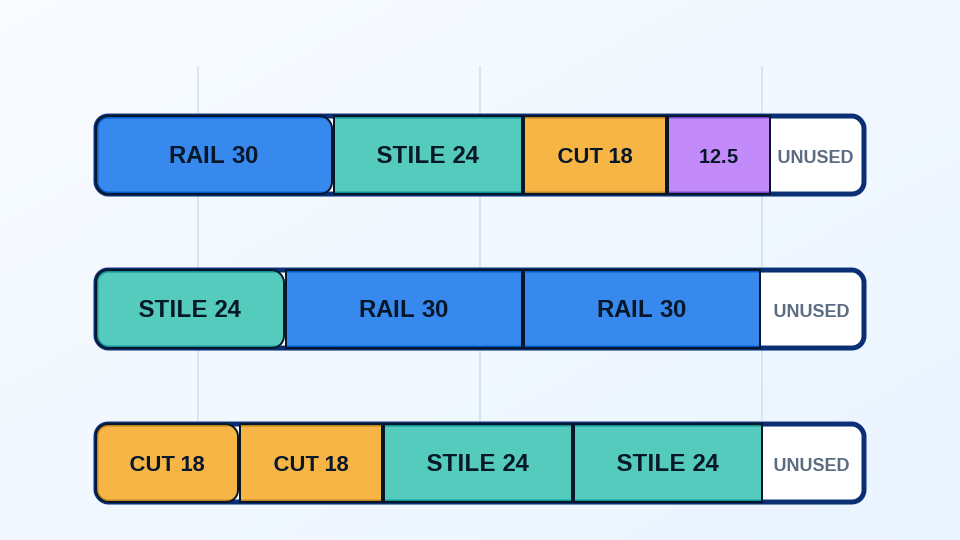
Many cutting jobs are linear: boards cut to length, conduit cut into runs, pipe sections, closet rods, trim pieces, aluminum bar, or other stock sold in standard lengths.
The one-dimensional cutting stock problem asks how to assign required cut lengths to stock pieces while using as few stock pieces, or as little material, as practical.
A cut-list optimizer helps you enter the stock length, required parts, quantities, and saw blade thickness, then inspect a candidate plan before cutting material.
What is 1D cutting stock?
1D cutting stock is the task of cutting shorter pieces from longer stock where only one dimension matters: length. Each stock piece has a usable length, and each required part has a cut length and quantity.
The solver returns a layout showing which cuts are assigned to each stock piece and where each cut starts. The plan can help reduce material use, organize cut order, and identify whether a limited supply of stock is enough for the requested parts.
Real cutting workflows may still require shop judgment. Defects, end trimming, grain, labeling, clamps, machine limits, and operator preference can all affect the final plan.
What information do you need?
1. Stock length
Enter the usable length of the material. Keep units consistent across stock length, cut lengths, and kerf.
2. Stock availability
Use sufficient stock when you want the solver to use however many stock pieces are needed. Limit stock count when you want to see how much of the request can fit in a fixed material supply.
3. Saw blade thickness
Kerf is the material removed by the saw blade or cutting tool. A cut list that fits with zero kerf may fail once cut thickness is included.
4. Required cuts
Add each cut type once, with its length and quantity. Clear names make the output easier to review and share.
Worked example: rails and stiles from 96-inch stock
Suppose you have 96-inch stock and a 0.125-inch saw blade. The required cuts are:
| Cut | Length | Quantity |
|---|---|---|
| Rail | 30 | 6 |
| Stile | 24 | 8 |
| Spacer | 12.5 | 10 |
Open the 1D cutting-stock optimizer, enter a stock length, add cut types, and review the returned stock diagrams and placement details.
The total requested cut length is the sum of each cut length times its quantity:
6 x 30 + 8 x 24 + 10 x 12.5That total is a useful lower bound, but it does not by itself prove how many stock pieces are needed. Kerf and the way cuts combine on each stock piece affect the final result.
How to plan a linear cutting layout
Step 1: Define usable stock length
Use the actual usable length after trimming damaged ends or accounting for shop-specific allowances.
Step 2: Decide whether stock is sufficient or limited
Sufficient stock asks for a complete plan. Limited stock asks how much can be placed within the available count and reports any unplaced cuts.
Step 3: Enter required cuts
Add each named cut type once with a quantity. If two parts have the same length but different labels, keep them separate so the output matches your project.
Step 4: Include kerf
Enter a nonnegative saw blade thickness. Small kerf values can matter when several cuts nearly fill a stock piece.
Step 5: Run and inspect the plan
Review stock used, cuts placed, utilization, waste, status, and the per-stock placement table. If stock is limited, check any unplaced rows before relying on the plan.
How do you measure stock utilization?
A simple measure is stock utilization:
Stock utilization = length of placed cuts / length of used stock x 100%
Waste percentage is the remaining share of the used stock length. Kerf also consumes material, so use the cut diagram and details table together when estimating real material use.
Why can linear cutting stock be hard?
The arithmetic looks simple, but cut combinations multiply quickly. A set of cuts may have many possible assignments to stock pieces, and the smallest leftover on one stock piece is not always best for the overall job.
- Repeated quantities create many possible groupings.
- Kerf changes what fits together on each stock piece.
- Limited stock can require deciding which cuts to prioritize.
- Good utilization still needs practical review before cutting.
When should you use a 1D cutting-stock solver?
Use a 1D cutting-stock solver when the material can be represented by length only. Common examples include boards, rods, pipes, conduit, trim, molding, rebar, and bar stock.
Use a 2D cutting-stock solver instead when both length and width matter, such as cutting rectangular cabinet parts from sheet goods.
FAQ
Does the solver guarantee the best possible cut list?
Only rely on an optimal label when the result status supports it. Otherwise, treat the result as a feasible candidate plan to review.
Can I use decimals?
Yes. Use consistent units and enter decimal values for stock length, cut lengths, and kerf.
What happens if I limit stock and not every cut fits?
The results show what was placed and list unplaced cuts in the details table so you can adjust stock availability or part counts.
Further reading: Paul C. Gilmore and Ralph E. Gomory, A Linear Programming Approach to the Cutting-Stock Problem, Operations Research 9(6), 1961.